# MitID References
## Platforms and browsers Supported Combinations for MitID
For MitID to work on your computer, it requires an operating system and an internet browser that supports the use of MitID.
|Operating System|Internet Browsers|
|---|---|
|Microsoft Windows 10|Mozilla Firefox|
|Google Chrome|
|Microsoft Edge|
|Microsoft Windows 11|Google Chrome|
|Microsoft Edge|
|Apple Mac OS X 10.15|Apple Safari|
|Apple Mac OS 13|Apple Safari|
|Apple Mac OS 14|Apple Safari|
|Google Chrome|
We cannot guarantee MitID compatibility with other operating systems or browsers.
## Mobile Phones and Tablets Supported Combinations for MitID
|Operating System|Internet Browsers|
|---|---|
|Apple iOS 15 and 16|Mobile Safari*|
|Apple iOS 17 (Beta version)|Mobile Safari*|
|Google Chrome|
|Google Android 9|Google Chrome**|
|Google Android 13|Google Chrome**|
|Samsung Browser**|
|Google Android 14 (Beta version)|Google Chrome**|
|Samsung Browser**|
*In-app (SFSafari View Controller)
**In-app (Custom tabs)
Note: MitID app installation requirements apply.
Please note that you can only install the MitID app on devices that can guarantee the level of security required. This means that if your smartphone is jailbroken or rooted, or if you use a beta-version of iOS or Android, you will not be able to install the MitID app.
## Useful links
|Document Name|Reference Link|
|---|---|
|Android App Links|[APPLINK](https://developer.android.com/training/app-links)|
|Android Dynamic Links|[DYNA-MICLINK](https://firebase.google.com/docs/dynamic-links)|
|Universal Links (Apple Docs)|[UNILINK](https://developer.apple.com/ios/universal-links)|
|CanOpenUrl (Apple Docs)|[IOSCANOPEN](https://developer.apple.com/documentation/uikit/uiappli-cation/1622952-canopenurl)|
|Custom Tabs|[CUSTAB](https://developers.google.com/web/android/custom-tabs)|
|SFSafariView-Controller (Apple Docs)|[SFSAFARI](https://developer.apple.com/documentation/safa-riservices/sfsafariviewcontroller)|
|RFC8252 OAUTH 2.0 for Native Apps|[OAUTH2](https://tools.ietf.org/html/rfc8252#appendix-B)|
## MitID Customization /Branding
MitId page and logo can be customized as per your business requirements. ZignSec will help with customization, branding logo, css and html files.
#### Requirements
1. **Customized HTML file**
2. **Customized CSS file**
3. **Company Branding logo**
**Sample files:**
**1. Customization page:**
**1.1 [Html file](https://docs.zignsec.com/wp-content/uploads/2022/04/demo.txt)**
**1.2** **[Css file](https://docs.zignsec.com/wp-content/uploads/2022/04/ZignSec.txt)**
**2. Company Branding logo**
**2.1 [logo](https://docs.zignsec.com/wp-content/uploads/2022/04/ZignSec-Logo-4.svg)**
**Note:** File(logo) must be W 200 by H 120px. Logo should either utilize max width or max height. File format should be SVG only.
## MitID Customization complete package
HTML and CSS files will be customized as per your business requirements.
[**Full Package files**](https://docs.zignsec.com/wp-content/uploads/2022/04/ZignSec.Ui_-3.zip)
## [MitId identity flow example](https://docs.zignsec.com/api/v5/eid-mitid-dk/)
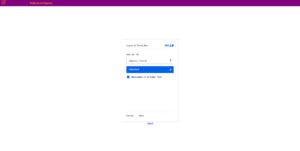
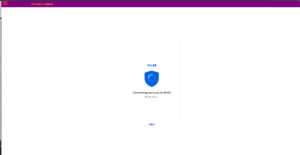
**MitID landing page:**
##### **Steps:**
**1.** **Use the redirectUrl for MitID flow**
[](https://docs.zignsec.com/wp-content/uploads/2022/04/ZignSec-Landing-Page.png)
[](https://docs.zignsec.com/wp-content/uploads/2022/04/MitId-Loading-page.png)
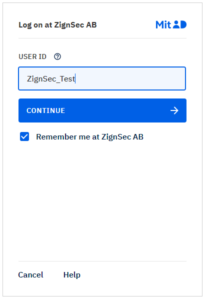
**2.** **Enter the Username**
###### **Username : Your Username ***
[](https://docs.zignsec.com/wp-content/uploads/2022/01/Enter-Username-1.png)
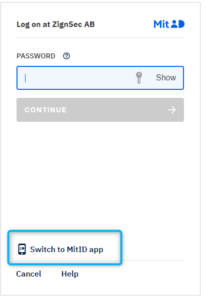
**3.** **Swap to APP switching**
[](https://docs.zignsec.com/wp-content/uploads/2022/01/App-Switching-1.png) [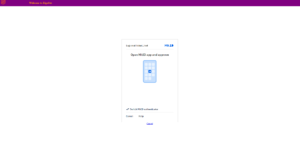](https://docs.zignsec.com/wp-content/uploads/2022/04/ZignSeclanding-page-MitId-app.png) [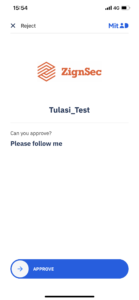](https://docs.zignsec.com/wp-content/uploads/2022/02/ZignSec-Logo-on-APP.png) [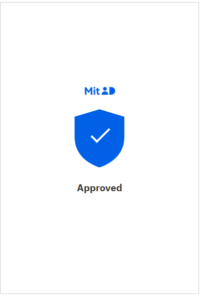](https://docs.zignsec.com/wp-content/uploads/2022/01/Approved-1.png)